FINCOMMANDPRIVATE BETACAD
EDMONTON 53.55°N 113.49°WEST. 2026
FinCommand
Login Sign Up
→ [ 01 ] SITREP — Bespoke Financial Software

Your Money. Your Rules. Under Your Command

BLUF — Budget, net worth, credit cards, retirement, stocks and rental properties in one private, Canadian-built app. One login replaces nine subscriptions.

14 days free · $0 today · then $14.99/mo · Cancel anytime
Theatre 01 / 11
Nighthawk
→ [ 02 ] Choose your mission

What kind of investor are you?

Pick one and we'll take you straight to the tools built for you.

All three are included during beta · Not sure yet? Keep scrolling

01

One login replaces nine subscriptions

$1,689 a year of tools, for $14.99 a month.

02

Everything feeds one picture

Budget, net worth, cards, stocks, retirement and real estate, in sync.

03

Private by design

Your finances are encrypted before they’re stored, and support opens them only with your permission. We never sell your data.

04

Built for Canadians

RRSP, RRIF, TFSA and FHSA aware, in Canadian dollars.

→ Core tools · included in every plan

Seven tools every member gets.

All seven come with your membership. No add-ons, no tiers.
Tool 01 of 07 · Budget
01 / Budget

Budgeting & Cash Flow

  • ✓Spending overview — every category, trend & outlier
  • ✓Import bank and credit-card statements (CSV or PDF)
  • ✓Each transaction sorted into income, expenses or savings for you
  • ✓Monthly trends & spending power, tracked automatically
  • ✓Printable reports for your records
  • ✓Set budget goals & track progress toward them
$137/yr value · included in your plan
Try Budget in the demo
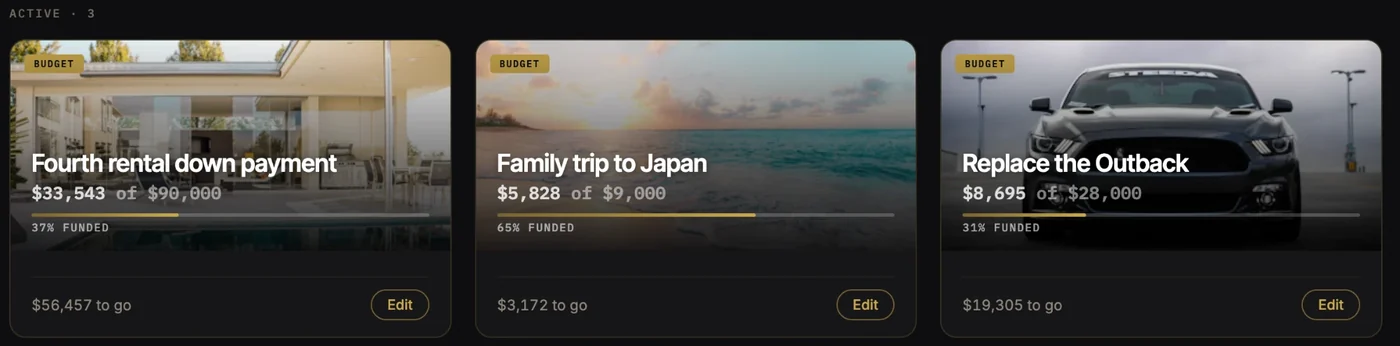
Three budget goals and how far along each is: Fourth rental down payment, $33,543 of $90,000 (37%); Family trip to Japan, $5,828 of $9,000 (65%); Replace the Outback, $8,695 of $28,000 (31%)
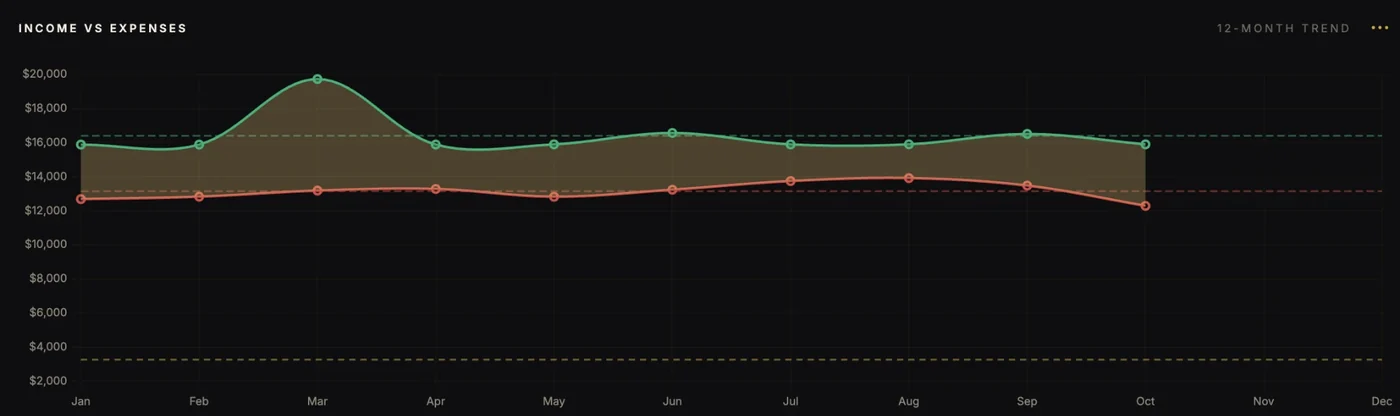
Income vs expenses by month, January to October, with the gap between them shaded and the average income, expenses and surplus marked
Net savings for October 2026: $3,610, a 22.7% surplus, from $15,898 of income and $12,288 of expenses, split across fundamentals ($11,038), fun ($1,249) and future ($3,610)
Screen 01 of 01 · Budget
Three budget goals and how far along each is: Fourth rental down payment, $33,543 of $90,000 (37%); Family trip to Japan, $5,828 of $9,000 (65%); Replace the Outback, $8,695 of $28,000 (31%)Net savings for October 2026: $3,610, a 22.7% surplus, from $15,898 of income and $12,288 of expenses, split across fundamentals ($11,038), fun ($1,249) and future ($3,610)Income vs expenses by month, January to October, with the gap between them shaded and the average income, expenses and surplus marked
Premium modules

The investing suite.

Stocks and Real Estate follow an investment through its whole life, from the first search to the final sale.

Free for beta members
08 / Stocks

Stock Portfolio & Research

From the first idea to the last trade, FinCommand is with you at every stage.

$230 value · free during beta
Feature 01 of 13 · ResearchAI research reports
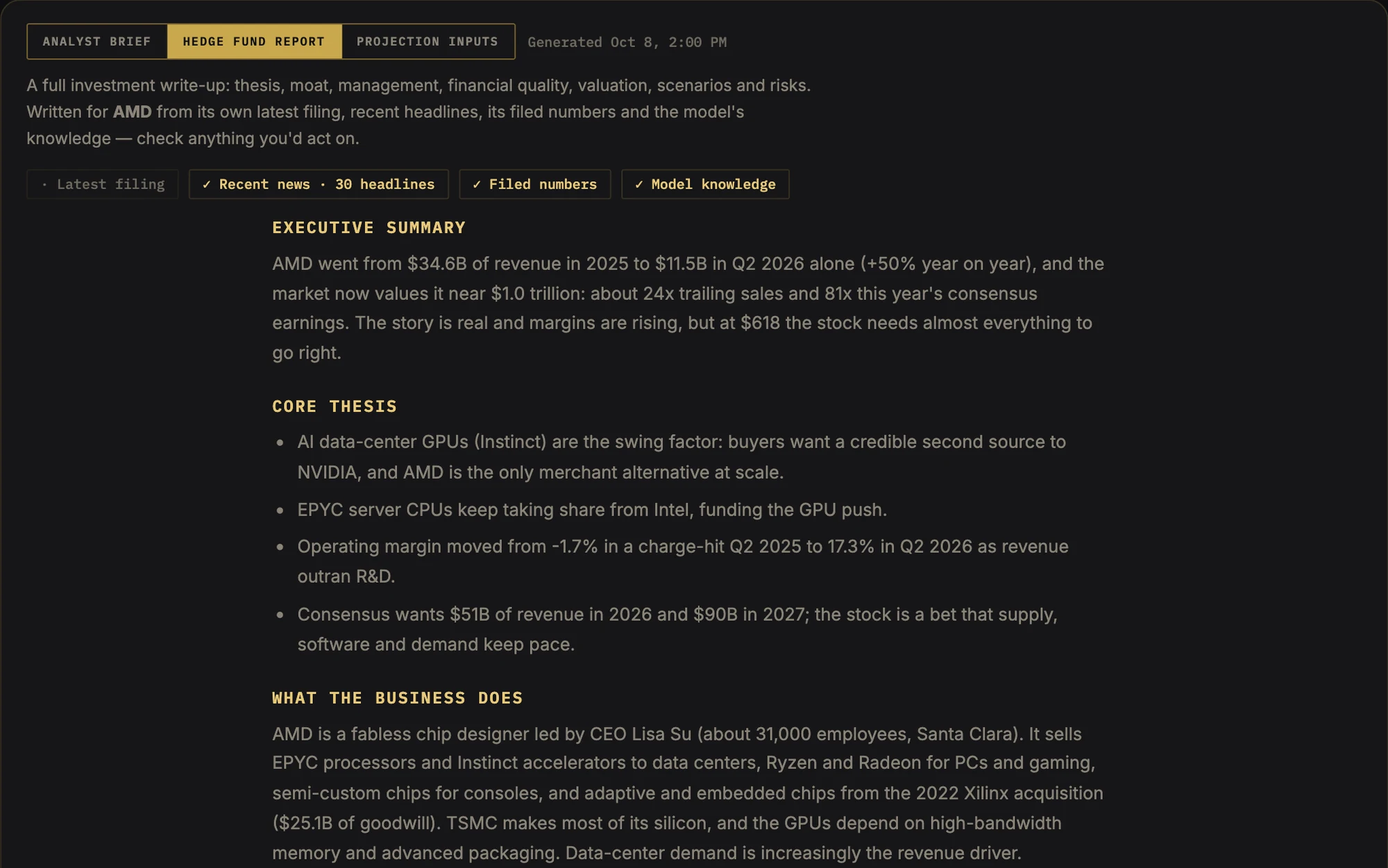
Deep Dive hedge fund report on AMD: executive summary, core thesis and what the business does, written from its latest filing, recent news and filed numbers
01Research

AI research reports

A hedge-fund-style report on any stock, from its filing, the news and its numbers, ready to download.

Compare: NVDA, AVGO and AMD side by side on trailing and forward P/E, PEG, EV/EBITDA, price to sales and book, DCF value, revenue growth and EPS, with the best figure in each row marked
02Research

Compare the numbers

Stocks side by side on valuation and growth, with the best figure in each row marked.

AMD quarterly income statement from Q3 2023 to Q2 2026: revenue, cost of revenue, gross profit, operating expenses, operating income and net income
03Research

Quarter by quarter

The actual income statement, balance sheet and cash flow, every quarter or every year.

Dividend lists: the eight Dividend Kings, from Johnson & Johnson to Walmart, each with its safety score, yield, annual dividend, a streak of 51 to 56 years, years since the last cut, five-year growth and last ex-date, beside the Champions, Contenders, Challengers, streaks at risk, monthly payers and fast growers
04Research

Dividend screener & safety scores

Screen every US dividend stock and see how safe each payout is, with its history, ex-dates and the Dividend Kings.

AMD projected share price to FY2030: bear, base and bull bands from $618.16 today to an expected $1,357, a 20.7% CAGR, with the Street’s 12-month target and the scenarios table
05Research

Your own price projection

Bear, base and bull cases to 2030, with the expected price and CAGR against the Street.

Watchlist of six stocks with price, 52-week range and buy or sell targets; GOOGL is in its buy zone
06Buy

Watchlists & buy zones

Every name you follow, with its 52-week range and the price where it becomes a buy.

Portfolio builder: a $671 a month plan toward a $350K target, NVDA and MSFT progress, and AMD in progress
07Buy

Portfolio builder

Plan your next buy: what you believe, what you want to own and the shares it takes.

Three accounts side by side, TFSA, RRSP and margin, each with its value, gain, cash and holdings
08Buy

Every account, every buy

TFSA, RRSP and margin side by side, each buy tracked in the account it was made.

Holdings table: each position with its account, shares, average cost, price, 52-week range, weight, value, gain and sector
09Manage

Every holding, unified

Positions and lots from every account in one place, with live prices and dividends tracked.

Earnings week board: Monday to Friday, each day split into before the open and after the close, with a logo tile for every holding or watchlist company that reports, the next report up, and the reports in each of the next 13 weeks
10Manage

Earnings, week by week

Every holding and watchlist name that reports, by day, before the open or after the close, 13 weeks ahead.

Stocks heat map: holdings grouped by sector, sized by weight and coloured by total gain
11Manage

Allocation at a glance

Holdings grouped by sector, sized by weight and coloured by gain.

Portfolio return against the S&P 500, time-weighted, with total value, total return and annualised return
12Manage

Benchmarked to the S&P 500

Your returns against the market, time-weighted, so you know if you are winning.

Rebalancing simulator: set a target for each holding and see exactly what to sell and what to buy to get back to it
13Sell

Rebalancing simulator

Know exactly what to sell and what to buy to stay on your target allocation.

All 13 Stocks featuresSee every one with real numbers.The demo opens on a sample investor. Nothing to set up, nothing saved.Try Stocks in the demo →
09 / Real Estate

Real Estate & Leasing

From the first search to the final sale, FinCommand is with you at every stage.
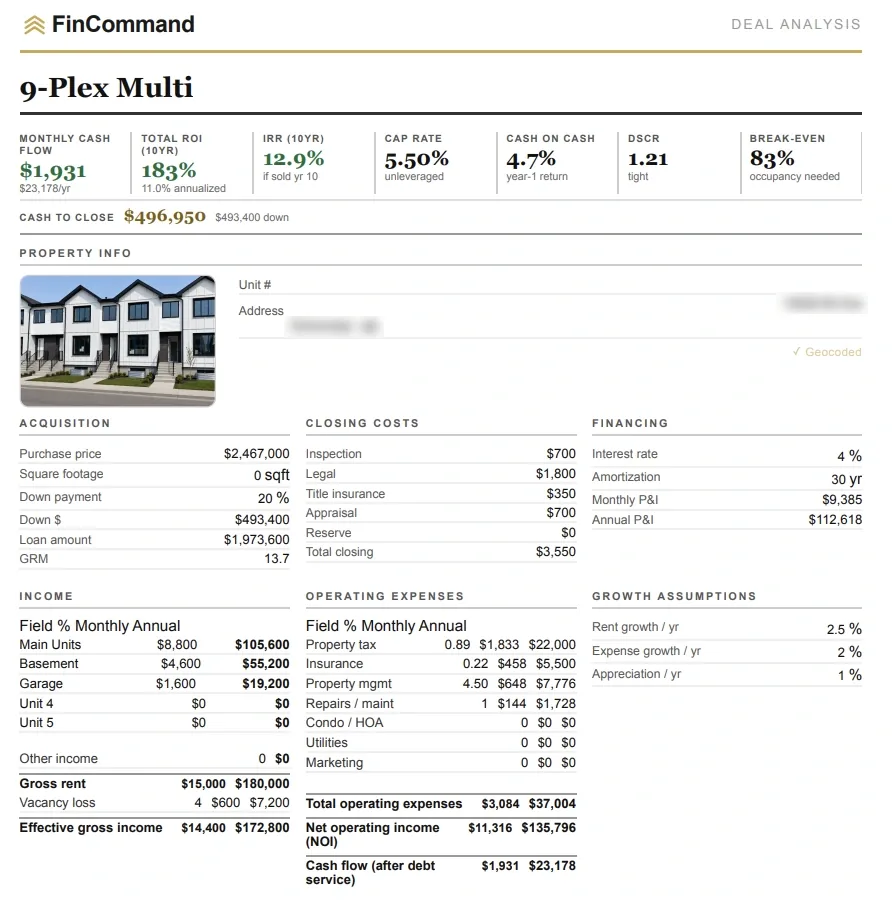
Feature 01 of 33 · FindPro formas, flips & BRRR
Deal analysis report for a 9-plex: $1,931 a month cash flow, 183% ten-year ROI, 5.50% cap rate, with acquisition, closing costs, financing, income and expenses
01Find

Pro formas, flips & BRRR

Buy-and-hold pro formas, flipper and BRRR calculators, and a deal report to print.

Deal map with each property you are analysing pinned by its monthly cash flow, and the leader, a fourplex at +$290 a month, opened to its cap rate, cash-on-cash return, 10-year ROI and price
02Find

Deal leaderboard & map

Every deal you are weighing, ranked by cash flow and pinned on the map.

Real Estate portfolio: total equity, market value, mortgage and HELOC, rent and cash flow, leverage against the HELOC limit, the next renewal, and each property’s cash flow, paydown and return side by side
03Buy

Cash flow & equity

Cash flow, equity, vacancies and paydown across every property, at a glance.

Mortgage and financing for three properties, each with its rate, payment and renewal, and the HELOC investment year by year
04Buy

Mortgage & HELOC, built in

Every mortgage with its rate and renewal, and what a HELOC investment earns you.

Smith Manoeuvre accelerators: debt swap, cash flow diversion, cash flow dam, DRiP accelerator and prime the pump, each switched on with its own inputs
05Buy

Smith Manoeuvre

Turn your mortgage interest into a tax deduction, then speed it up with five accelerators.

06Lease

Applicants apply from your link

No account. They answer your questions on their phone, and the whole application lands on a card.

Generate lease for an approved applicant, with the tenant, occupants, phone, address, start date and term already filled in
07Lease

Approve, and the lease fills itself

Their name, everyone living with them, phone, move-in date and term.

Custom lease builder: the lease sections on the left and the residential lease agreement it produces live on the right
08Lease

Your lease, your wording

Edit, reorder or leave out any section with a live preview beside it, or bring your own Word lease.
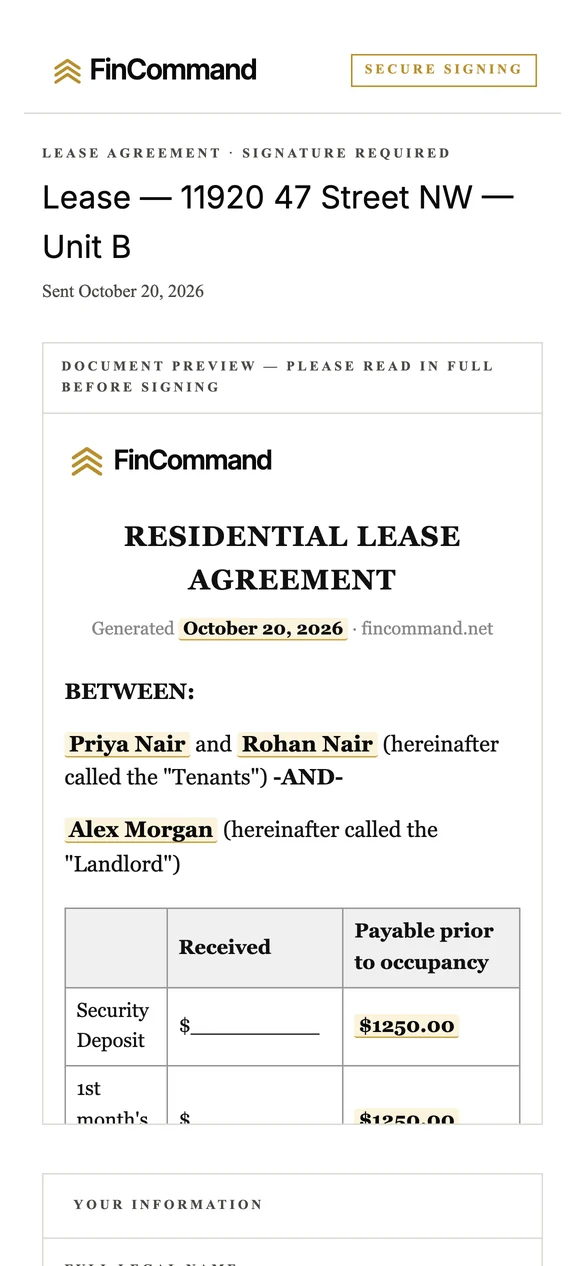
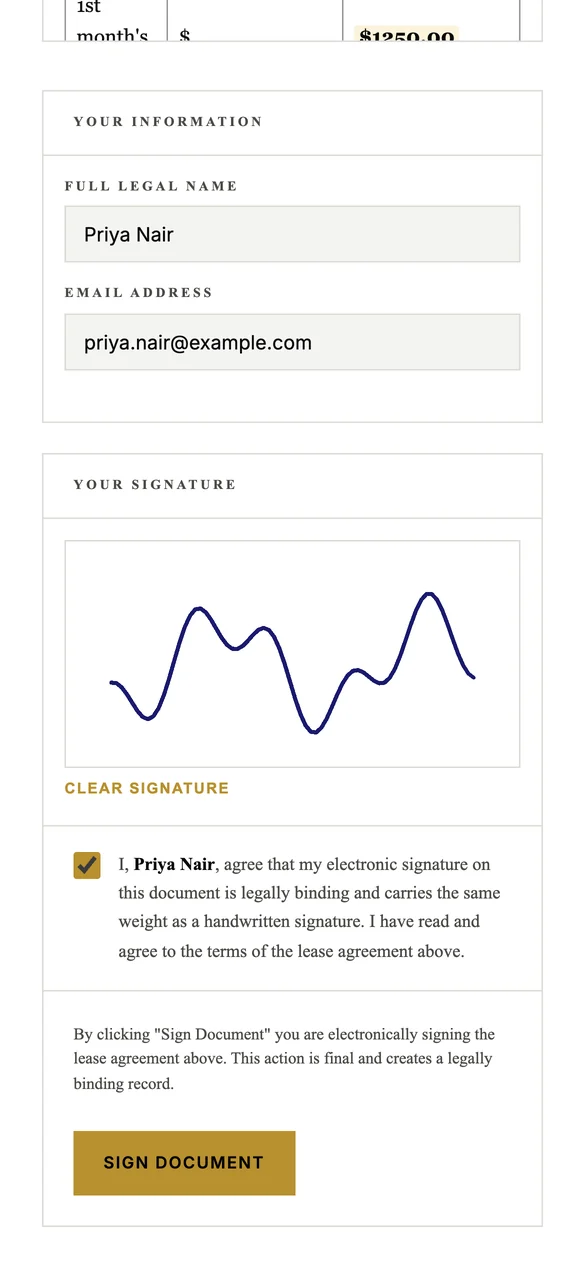
09Lease

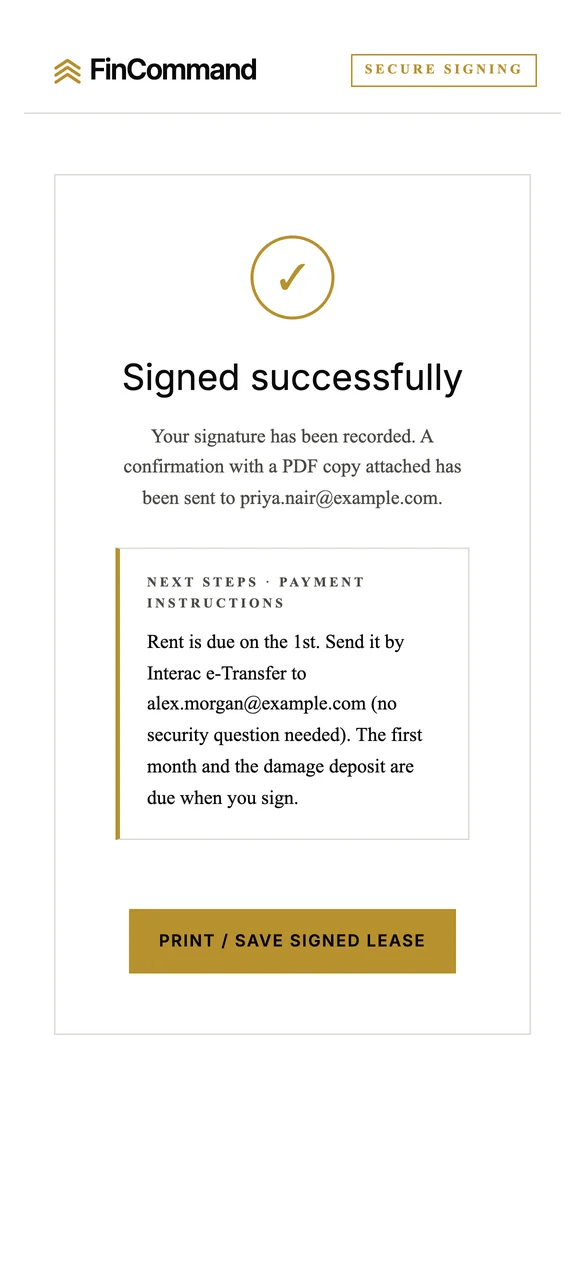
Signed on their phone

You sign once and send. They read it, sign with a finger and get a PDF with your payment instructions.

Rent: collected this month, owing by age, occupancy and deposits, then the rent roll, what needs attention, heads-ups and transactions, each on its own tab
10Rent

Every unit, every dollar

Collected this month, what is owed by age, occupancy, deposits held, and what needs you next.

Record payments: tick each tenant, the day it reached the bank, charge or waive the late fee, and rent paid early kept as a credit for the next month
11Rent

Record everyone’s rent at once

Tick who paid and the day it reached your bank, then charge or waive each late fee.

12Rent

Your tenant sees the same ledger

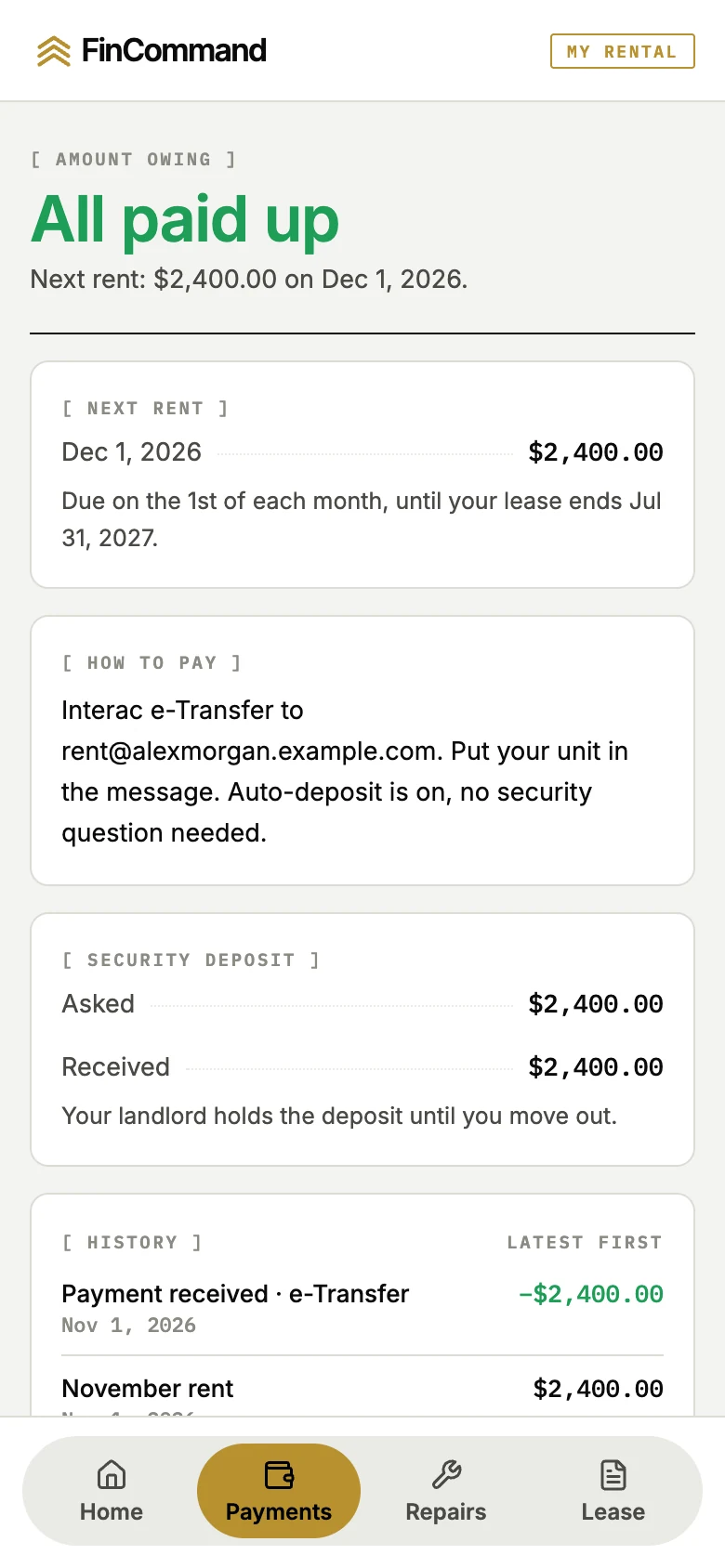
Check rent in from your phone. Your tenant gets one private link: what they owe, how to pay, their deposit.
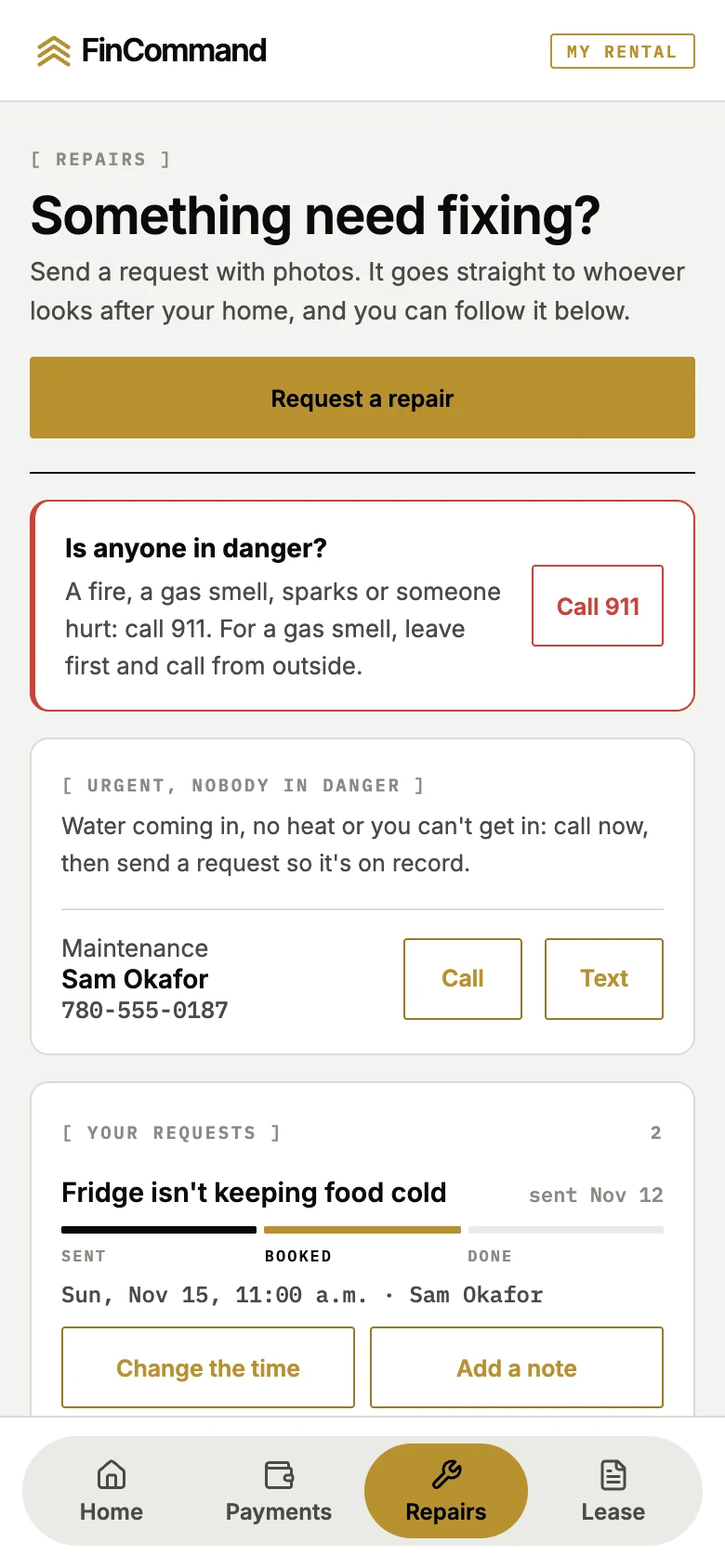
13Maintain

Tenants report it in their own portal

From Repairs in My Rental, or the QR code in their unit. No app, no password. A photo of the appliance sticker fills in the model number.

Maintenance board: open, urgent, to pay and closed tickets, each with its urgency, property, tenant, status and age
14Maintain

Every ticket on one board

Emergencies first, then urgent and routine, with who sent it and where each one stands.
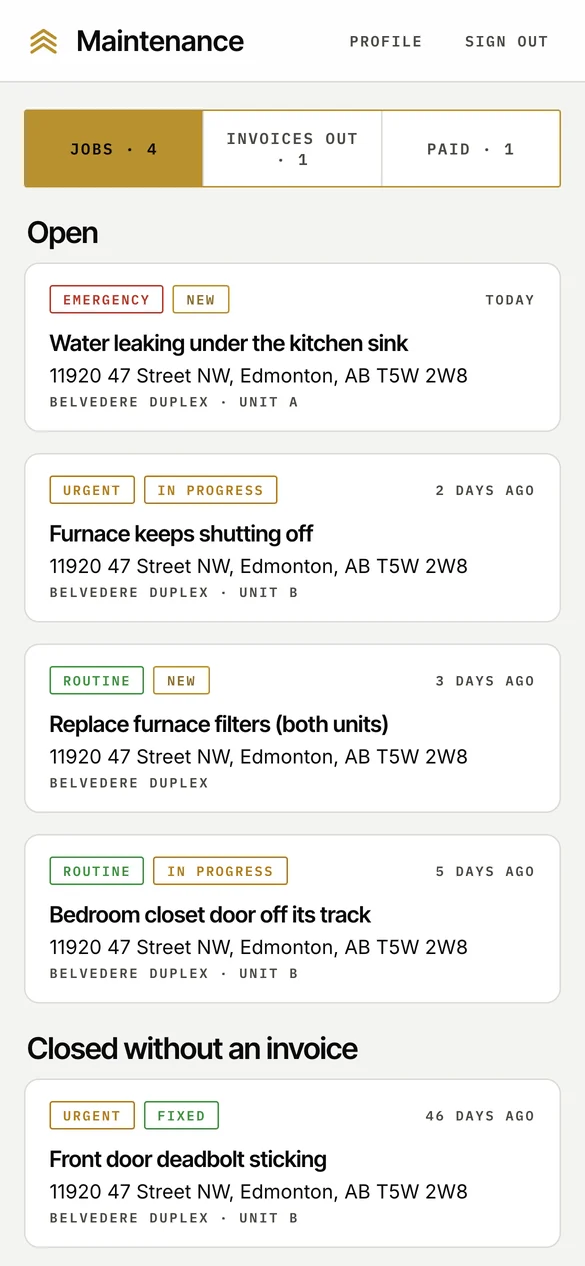
15Maintain

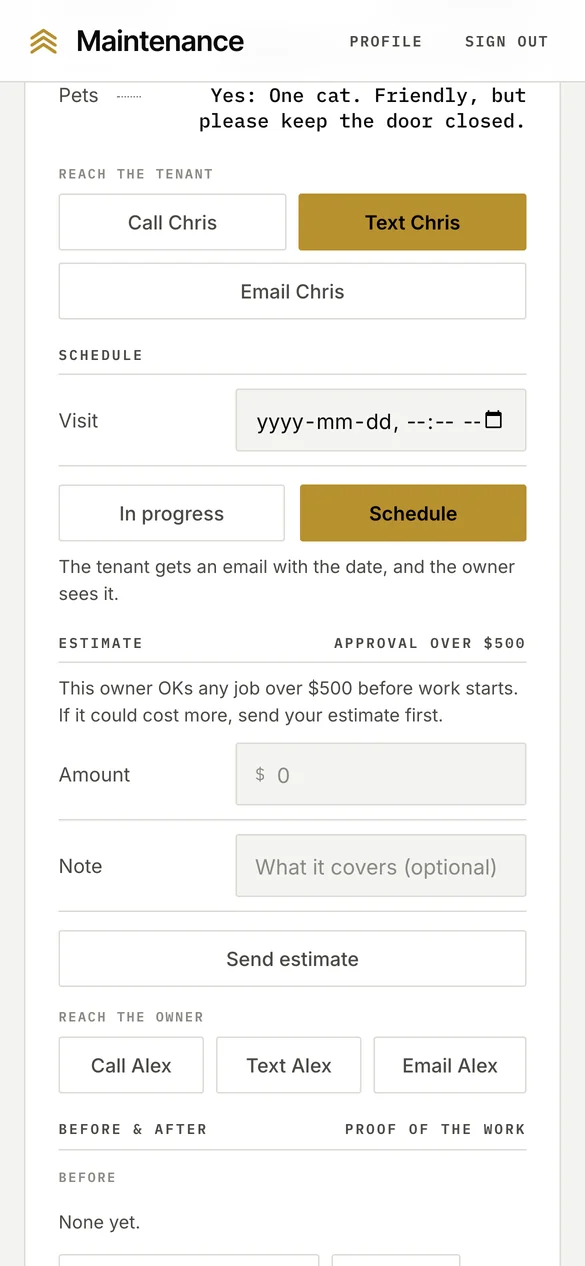
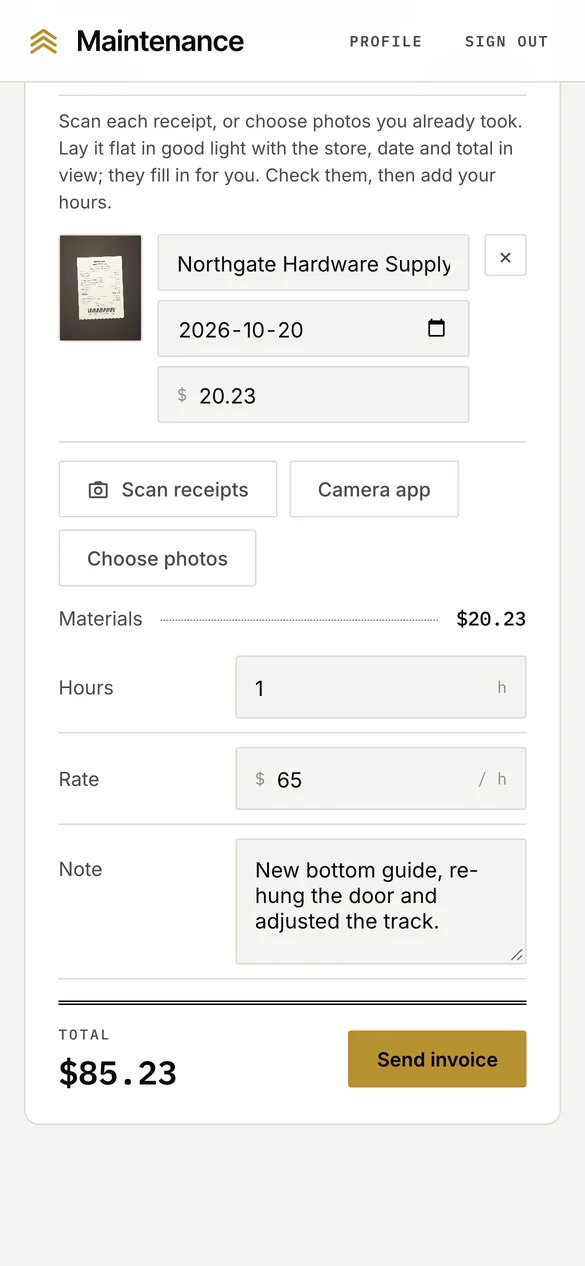
Your maintenance person’s own portal

They see only their jobs, book the visit the way the tenant asked, and a receipt photo builds the invoice.
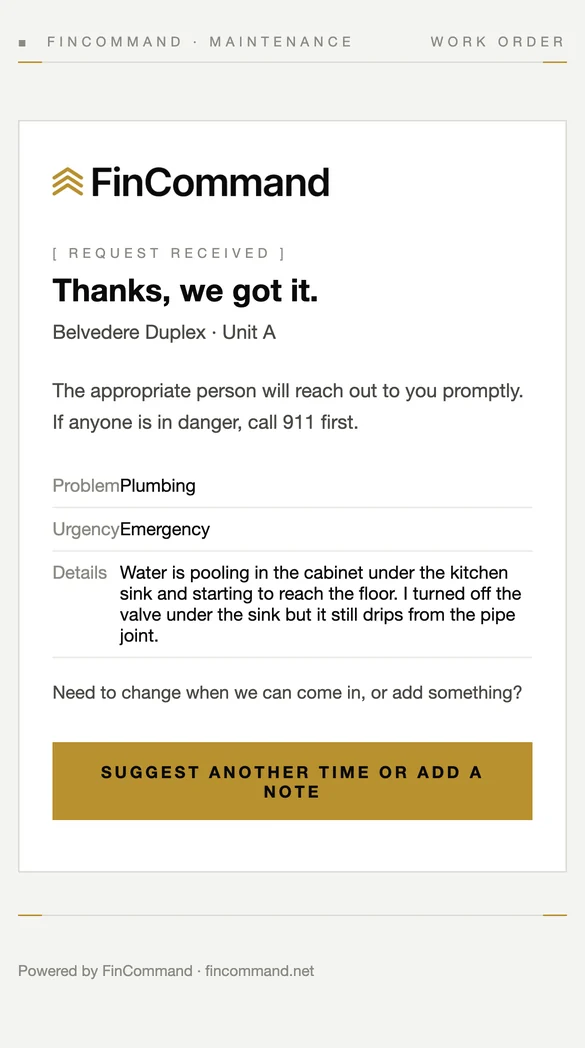
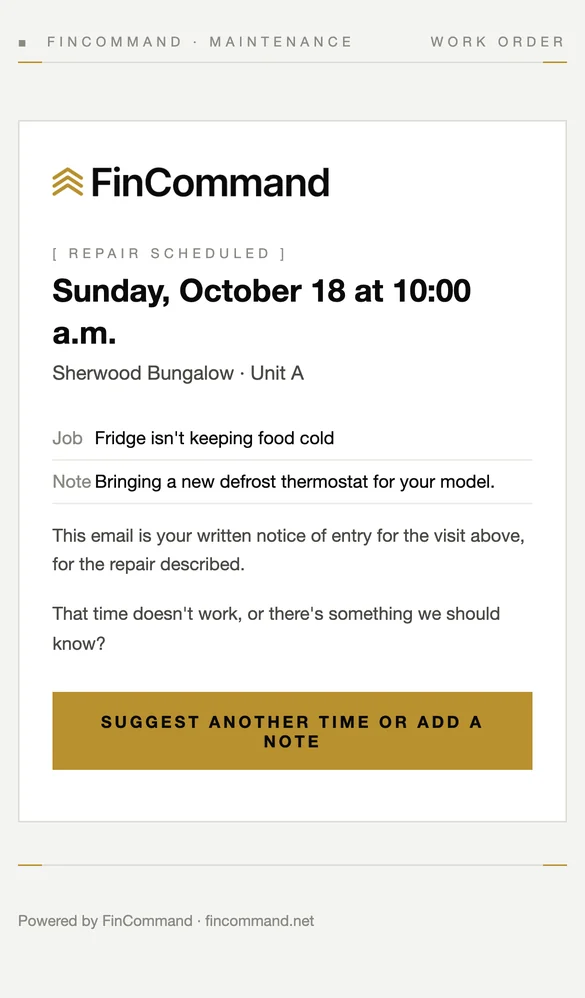
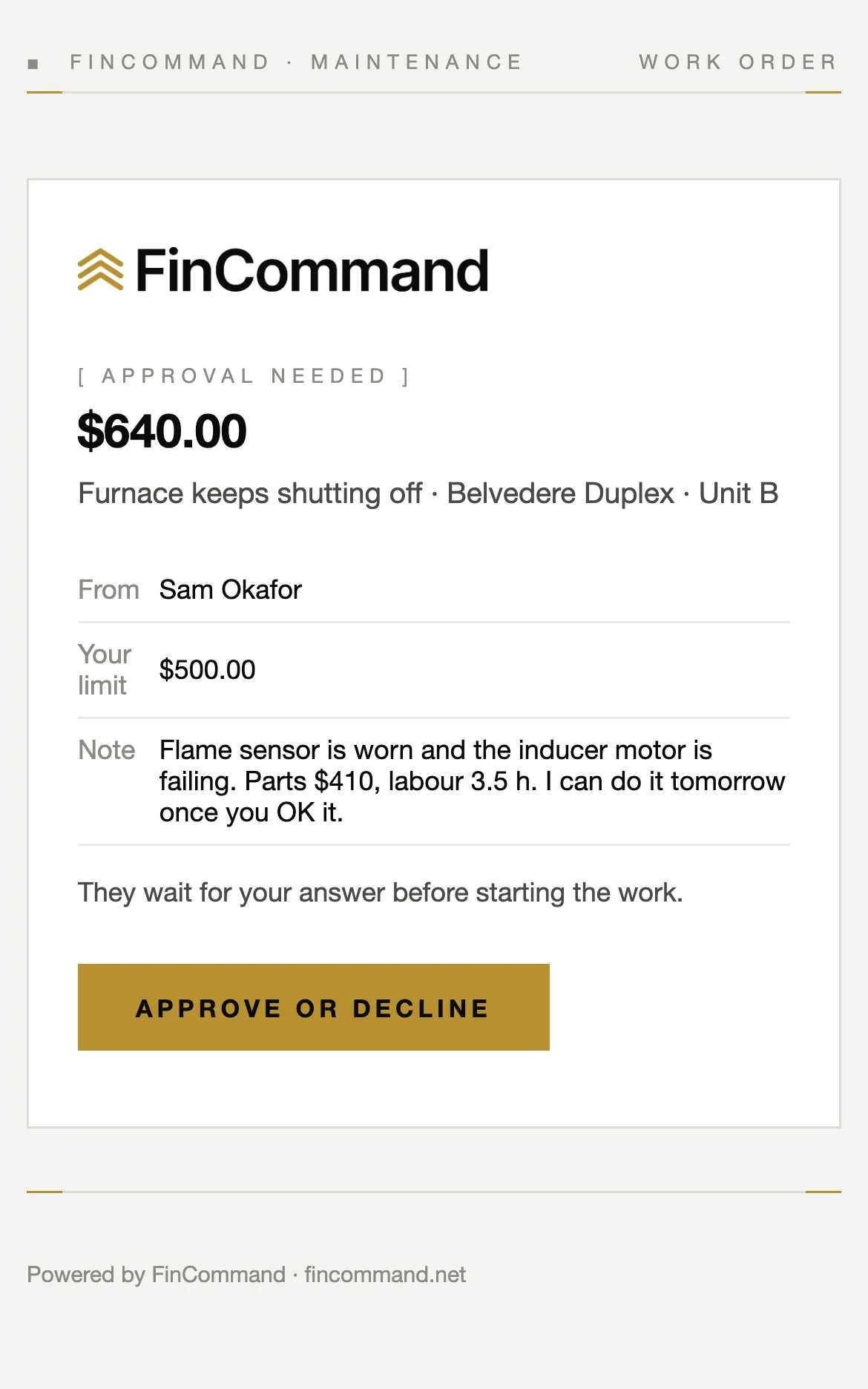
16Maintain

Emails go out by themselves

The tenant hears it was received and when the visit is booked. You are asked before a job goes over your limit.

A finished ticket: the invoice with its receipt, marked paid, and the tenant’s rating of the job
17Maintain

Paid, and rated by the tenant

The invoice shows who to pay and how. Mark it paid and the tenant rates the job.

Customize inspection form: rooms and items for a property, with locked rooms and the manager’s added rooms
18Inspect

Your inspection form

Build each property’s form once and lock what must stay the same. Your manager can still add rooms.
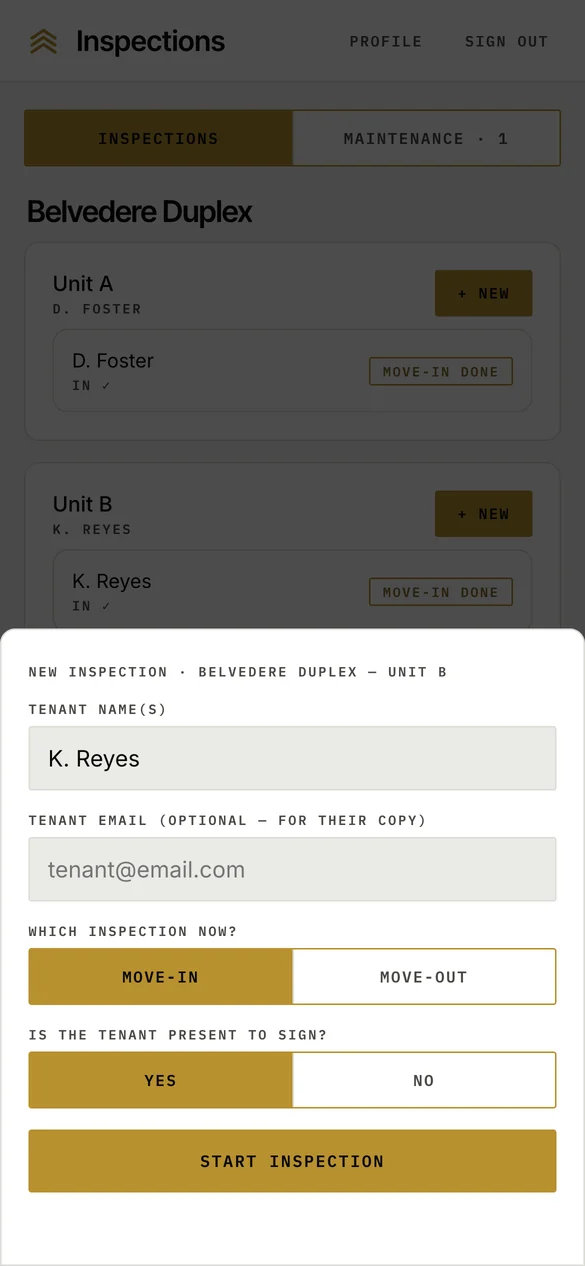
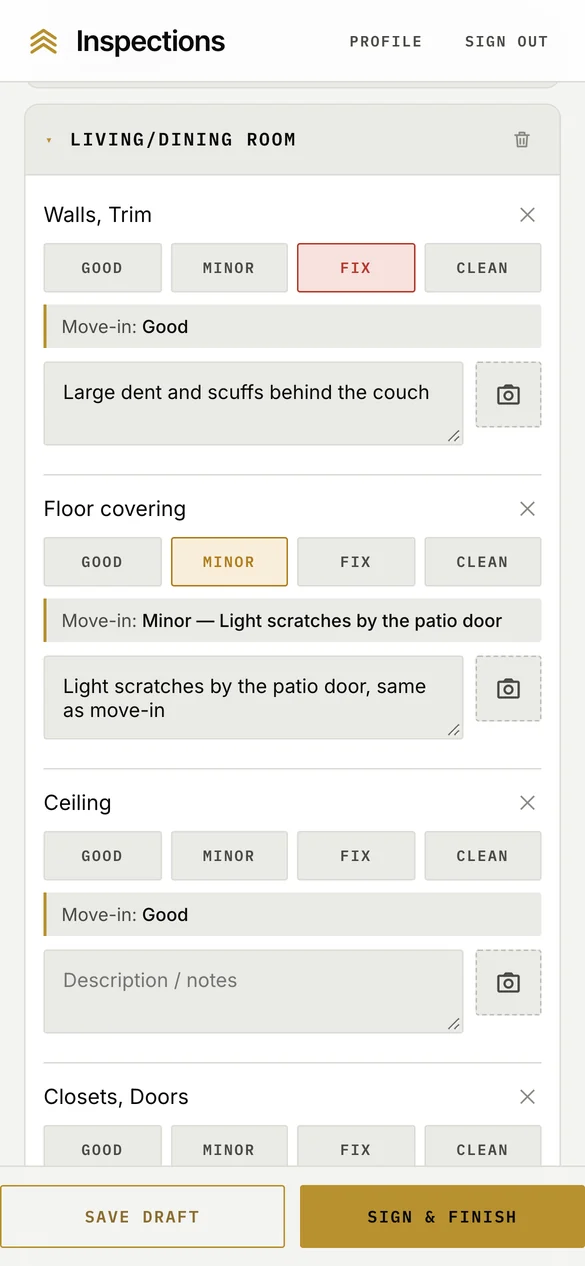
19Inspect

On your manager’s phone

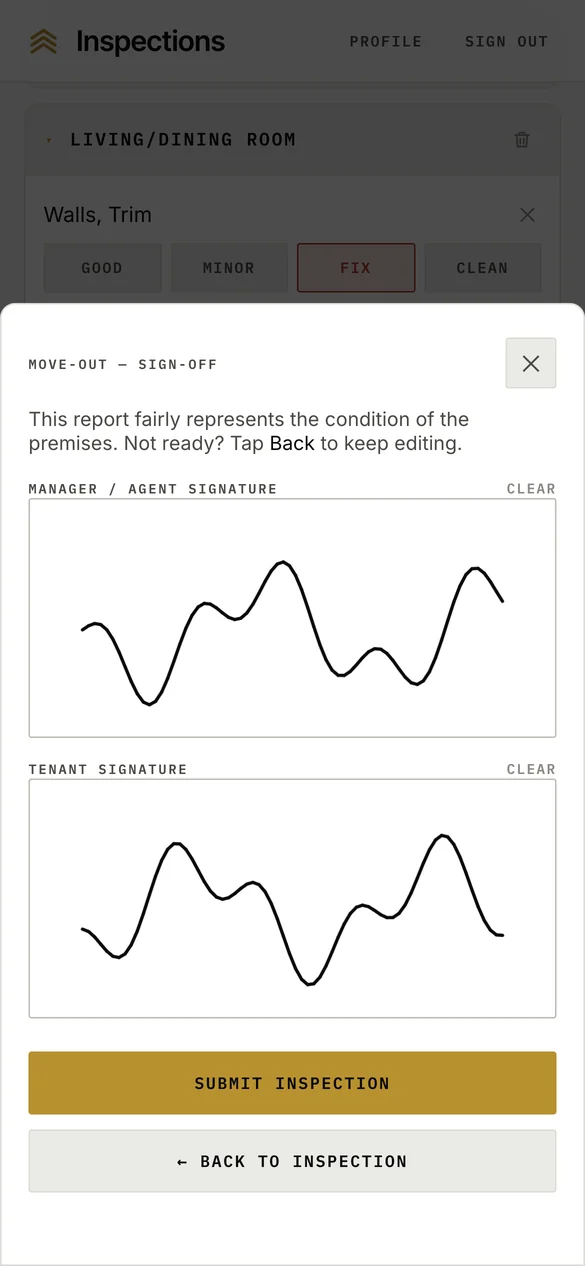
Move-in condition beside every line, and the tenant and manager sign on the spot.
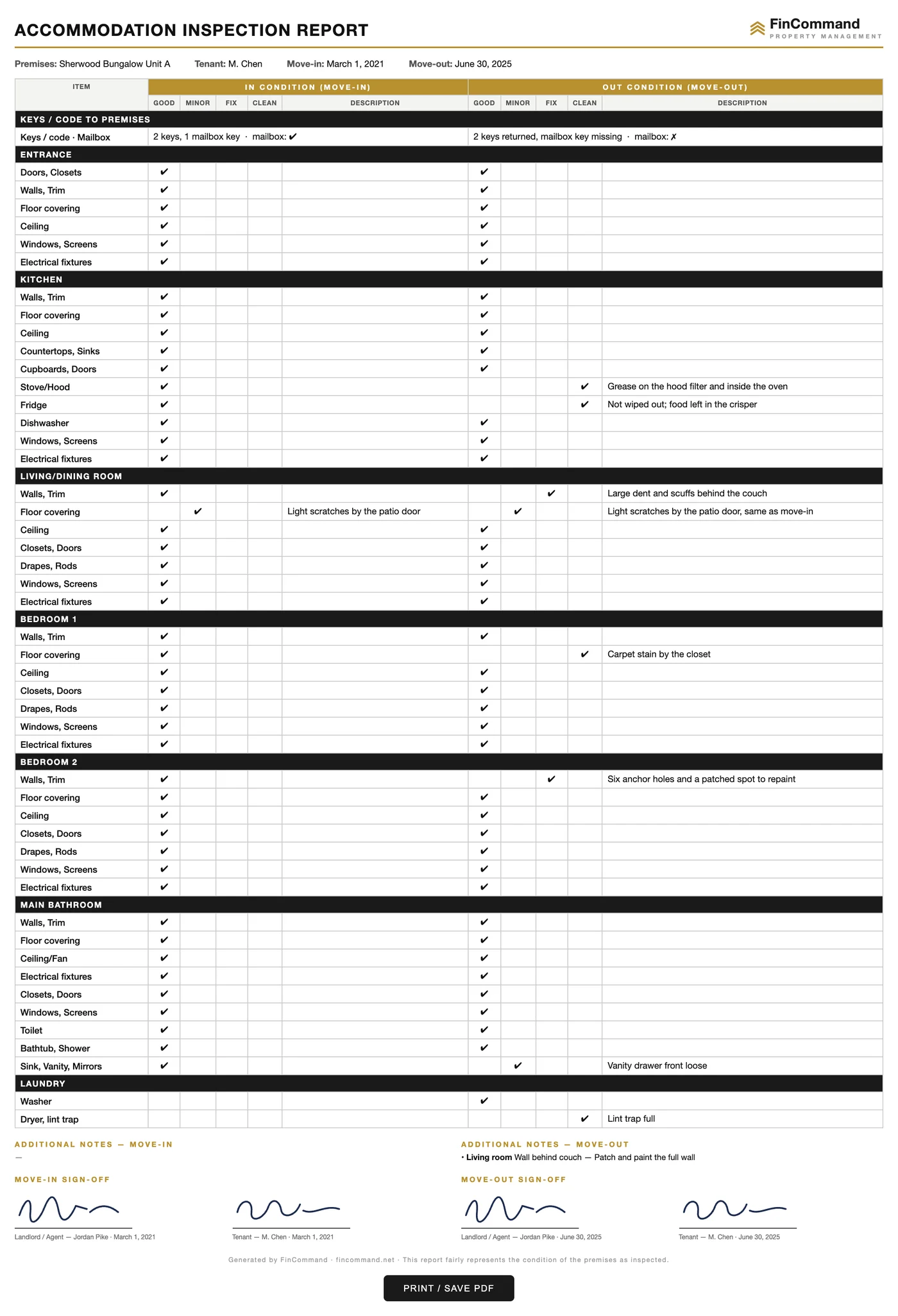
Printable inspection report with move-in and move-out condition side by side for every room
20Inspect

One report, both inspections

Move-in beside move-out with both signatures, emailed to you and the tenant.

Late rent: a 14-day notice waiting for your review, and K. Reyes’s two reminders, late letter and notice, with when each was opened
21Notices

Every late tenant, every step

Reminders, the late letter and the notice, with when each one was opened.
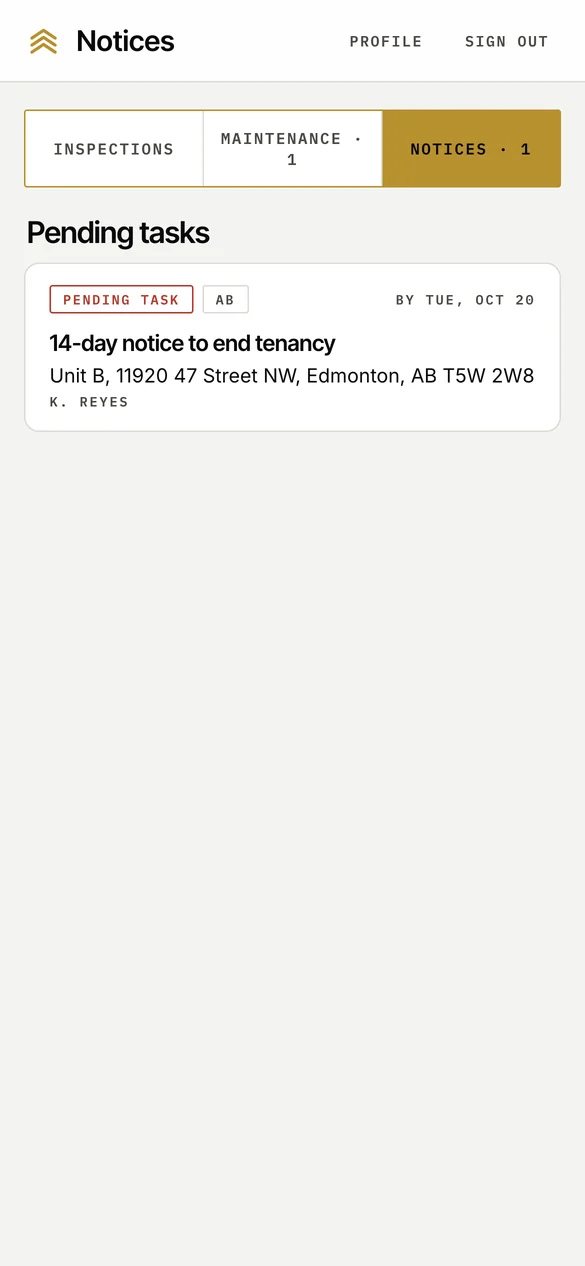
22Notices

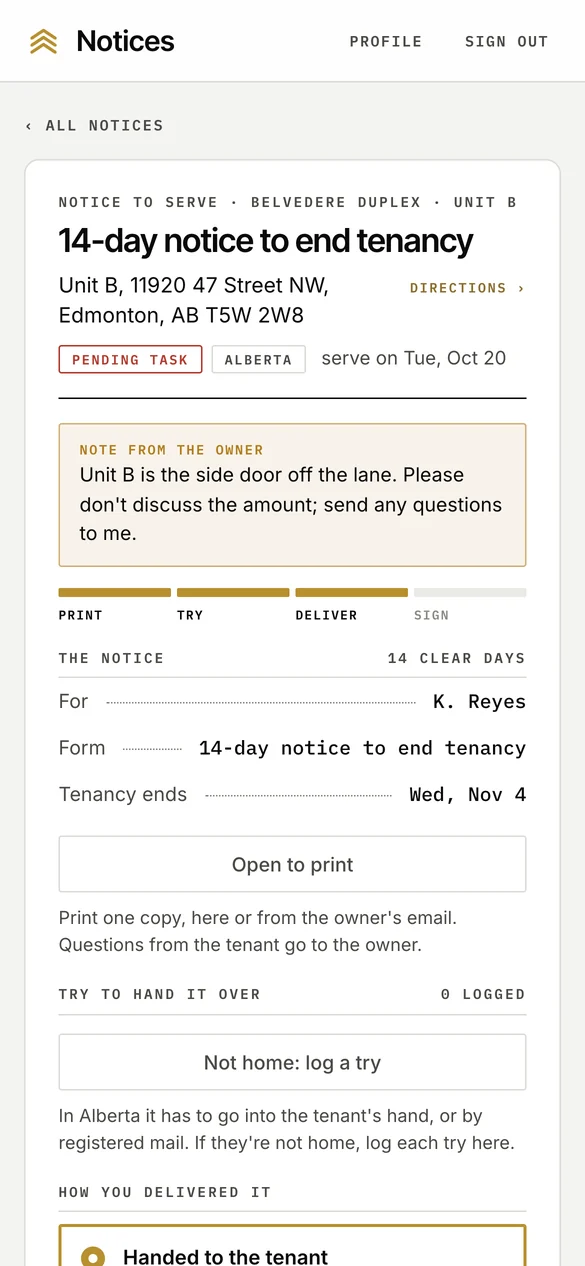
Your manager serves it

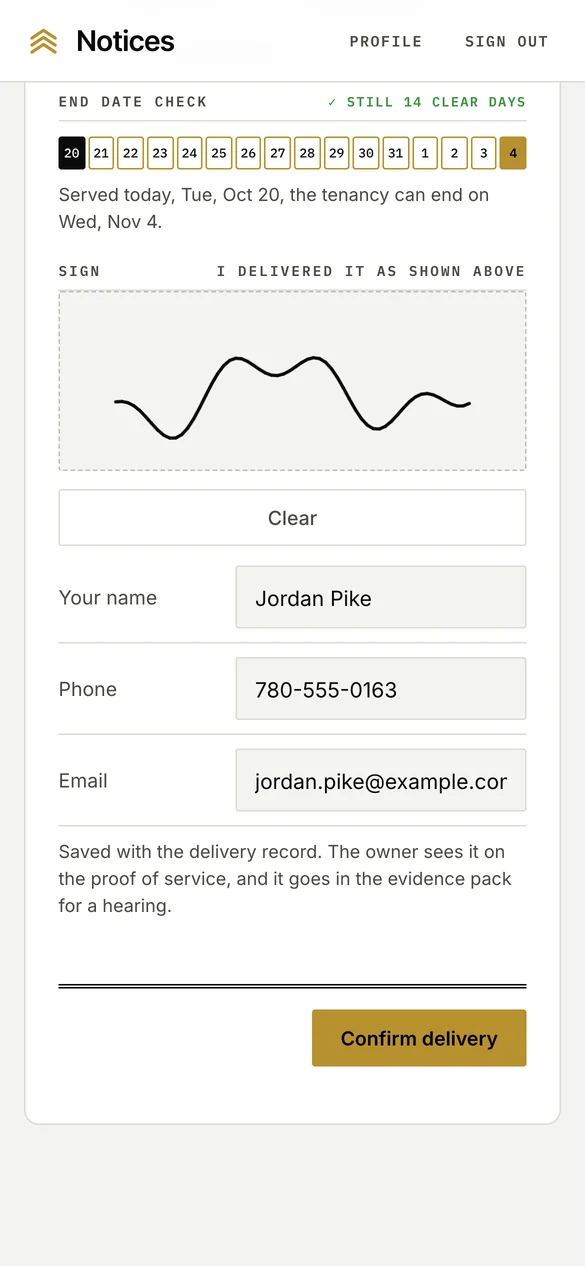
It waits in their portal with the province’s steps. They deliver it, photograph it and sign.

Proof of service and the road to the hearing: who served the notice, when and how, and every step since rent was due
23Notices

Proof of service

Who delivered it, when and how, and one evidence pack for the hearing.
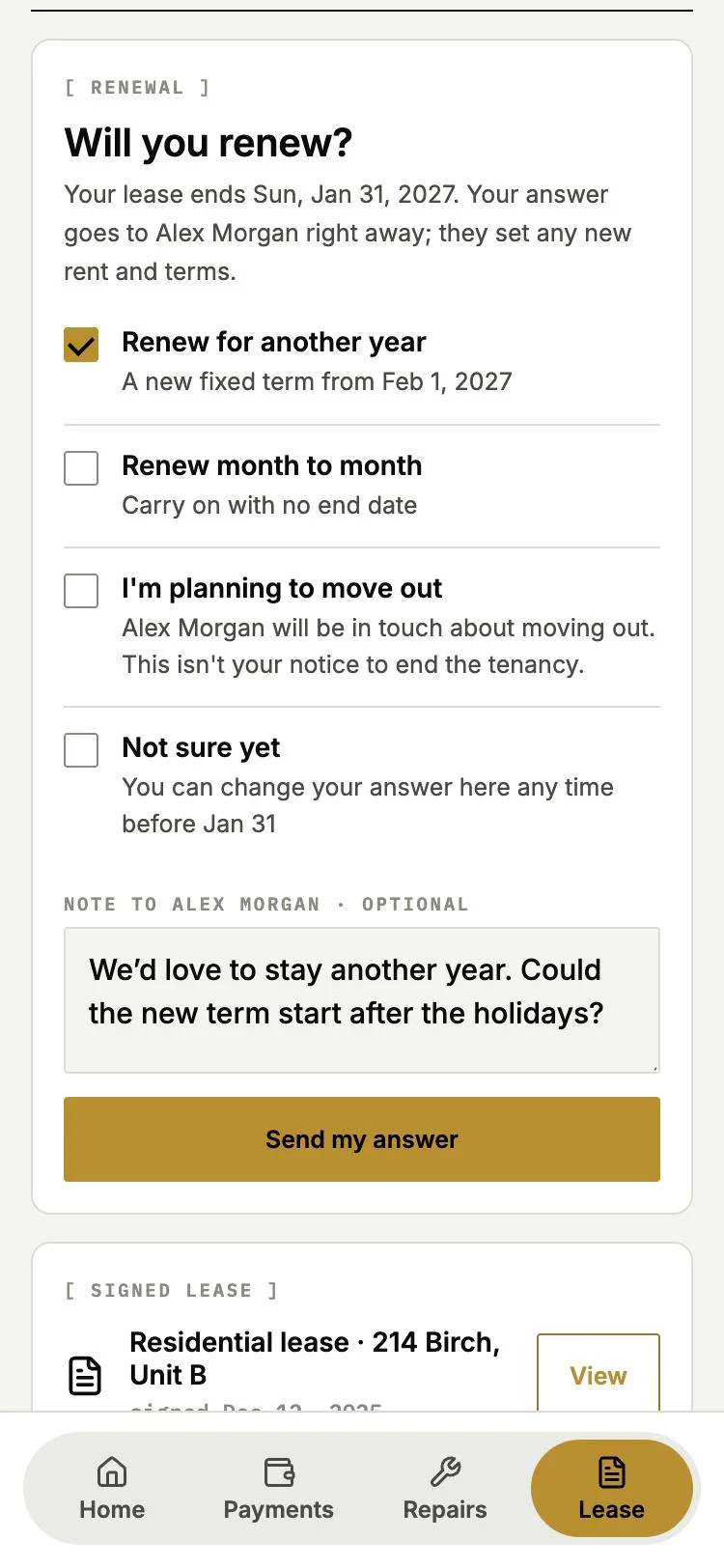
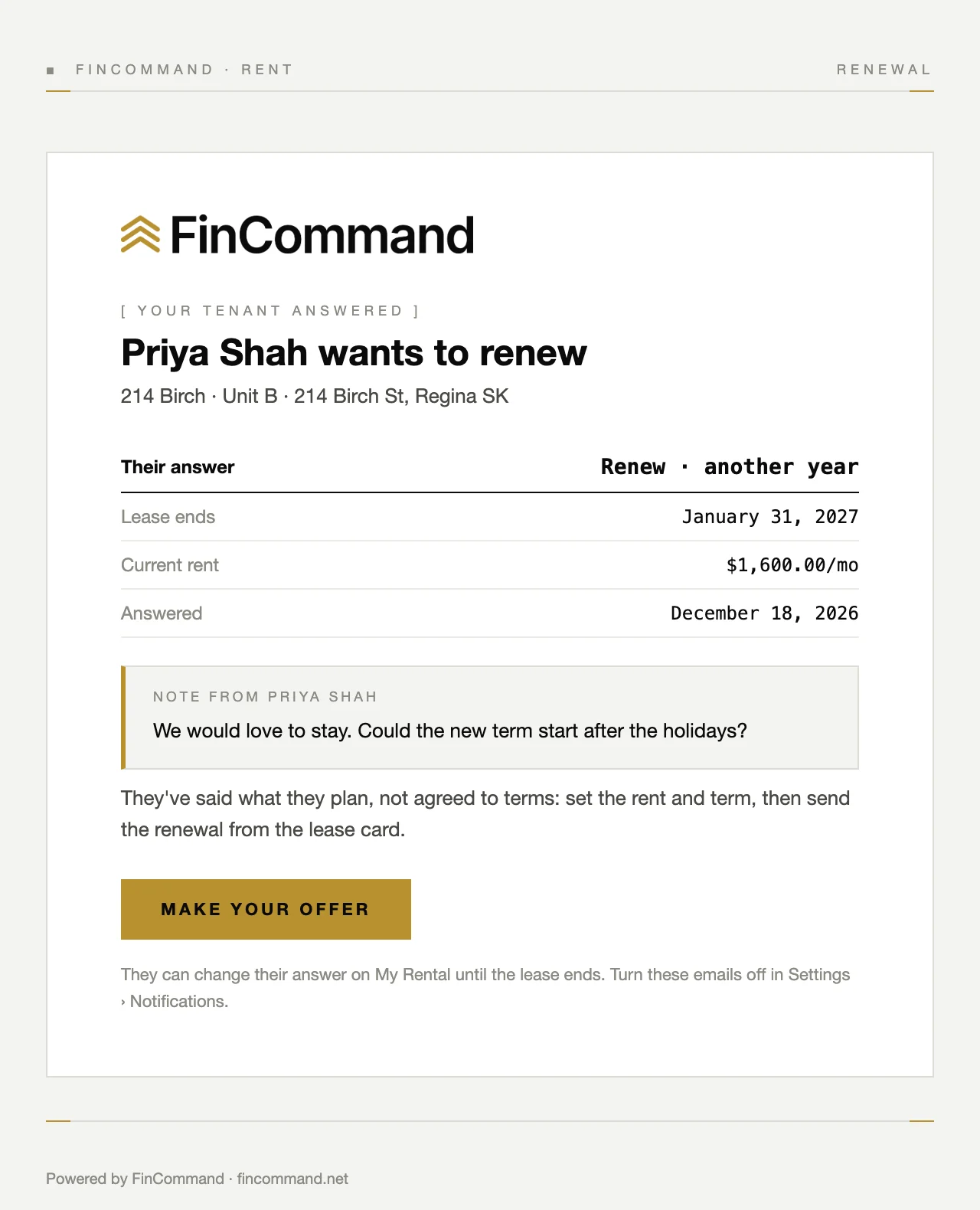
24Renew

Automatic lease reminders

Your tenants tell you, not the other way round: 45 days before a lease ends they’re asked if they’re renewing, and their answer lands in your inbox and bell. No forgotten dates, more time to plan the turnover.

Renewal for D. Foster: Alberta’s rules on increases and notice, the new rent and term
25Renew

Renewals with the rules in front of you

Your province’s rent cap and notice, and the renewal lease already filled in.

The tenant’s move-out clean-up checklist, signed by the tenant
26Move out

A move-out checklist they sign

Sent, viewed and signed, tracked like a lease.

The move-out statement the tenant receives: the deposit, each deduction, and the refund with its date
27Move out

The statement settles the deposit

Rent owing and repairs from the inspection, the refund and the province’s deadline, in one statement.

Team: managers and maintenance people in one list, with their role, properties, phone, rating and status
28Team

Everyone who helps, one list

Managers, maintenance and trusted trades, each with only the access you give them.
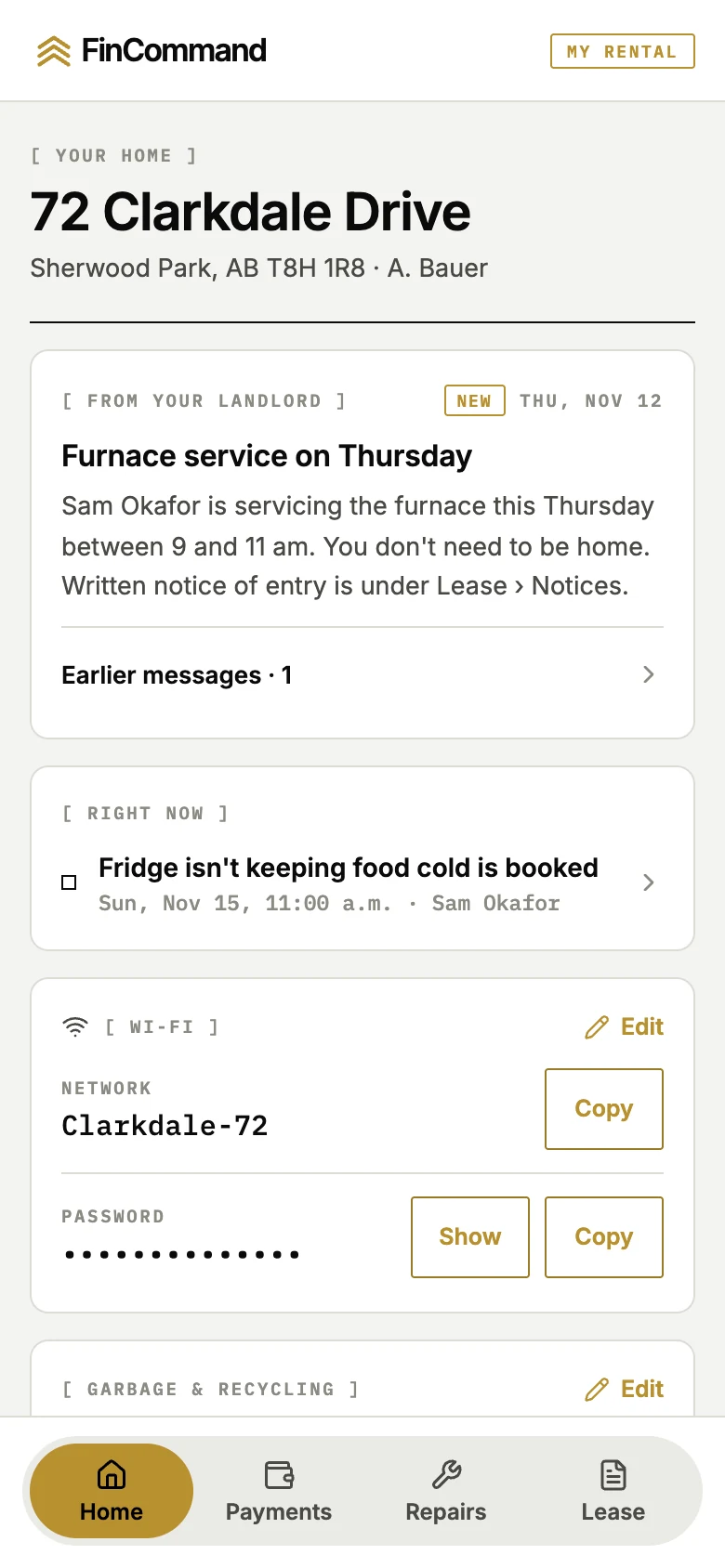
29Portals

Every tenant gets their own portal

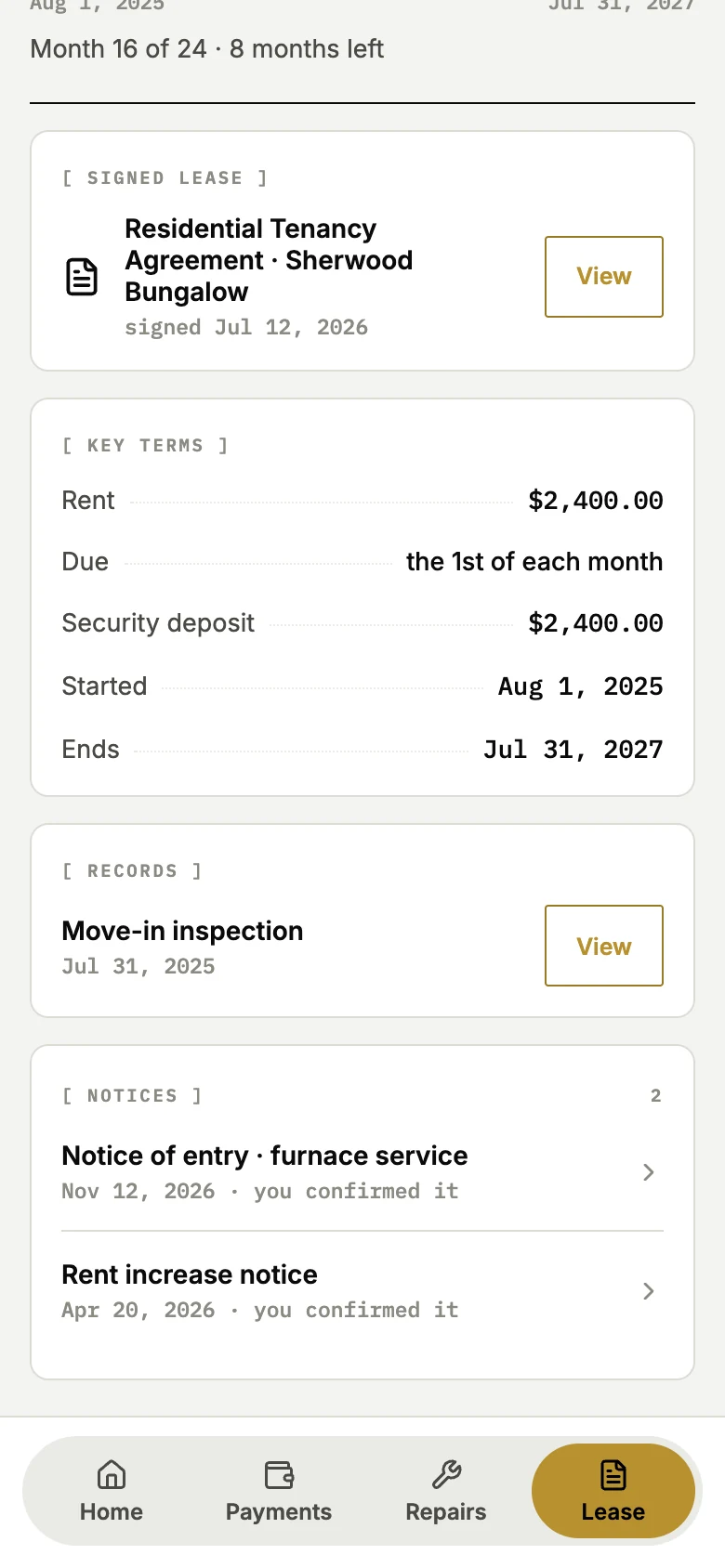
My Rental fills itself in from your records: rent and deposit, the signed lease, inspections and notices, plus the Wi-Fi, bins and who to call. They sign in with a code sent to their email, add it to their Home Screen, and can turn on phone notices for rent and repairs.
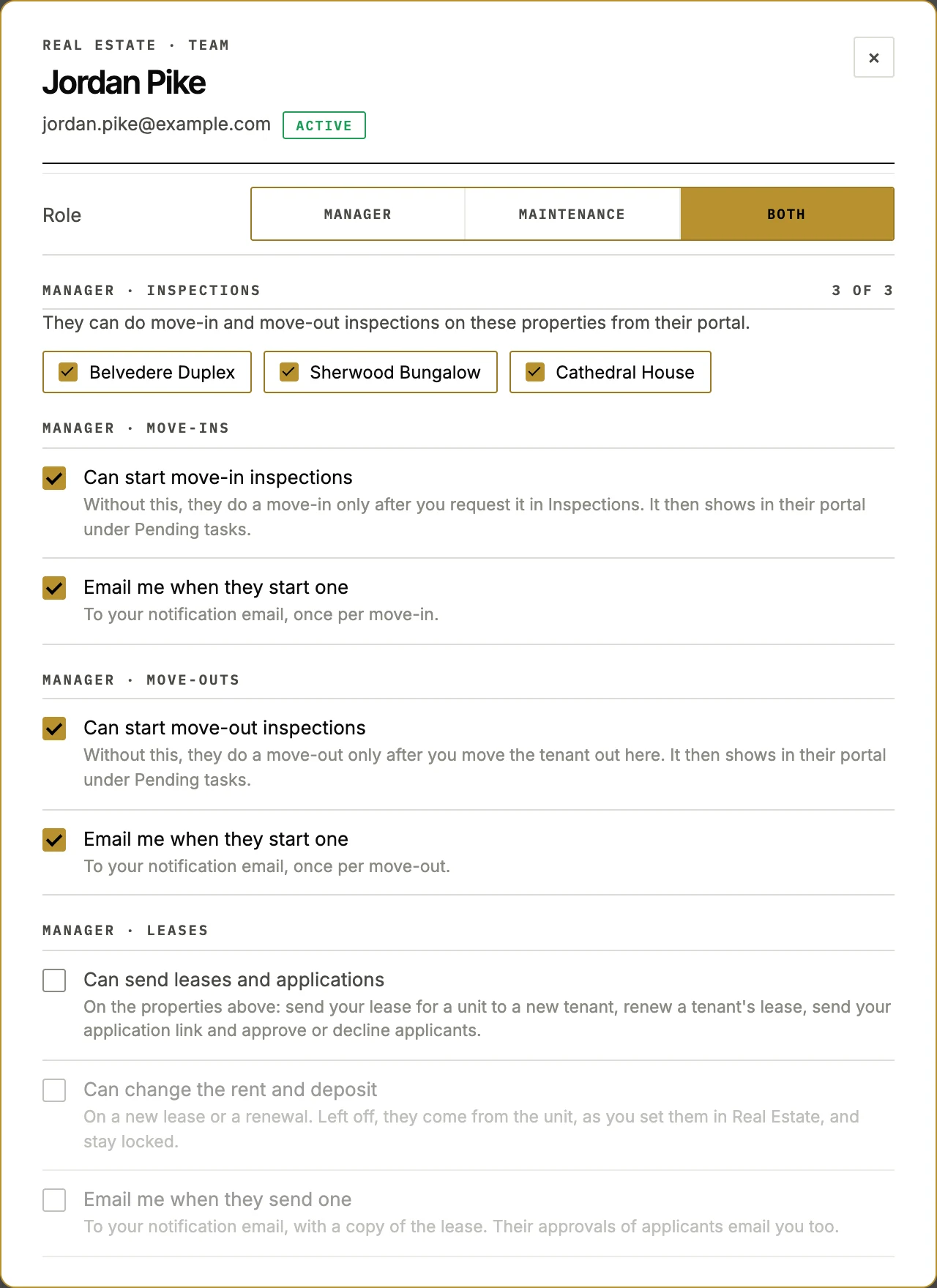
Jordan Pike’s access: manager and maintenance, inspections on three properties, starting move-ins and move-outs with an email to you, and sending leases left off
30Portals

Your manager’s portal, your rules

Each person sees only the properties you pick. Decide who starts move-ins and move-outs, who sends leases or changes the rent, and when you get an email.
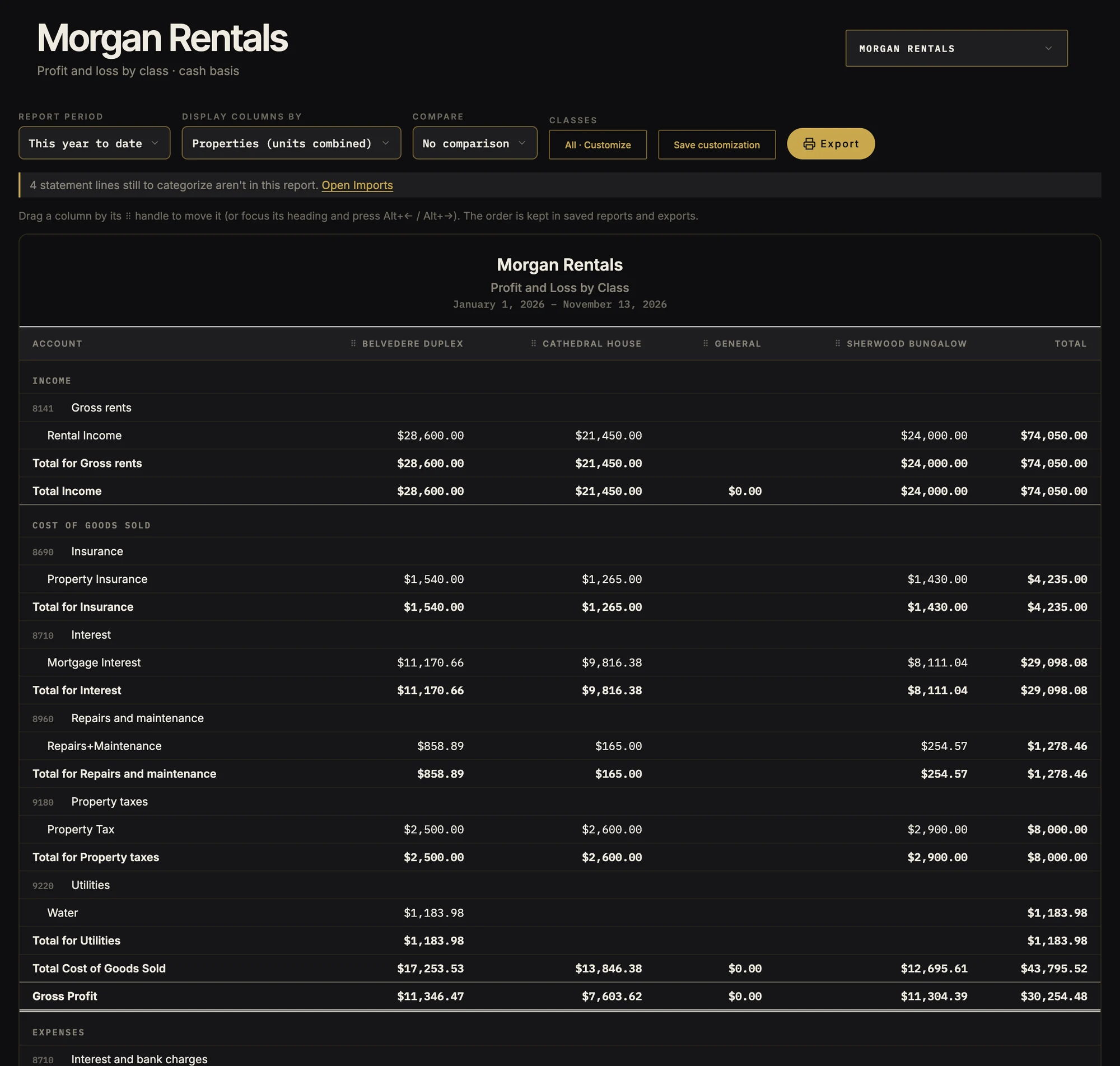
Profit and loss for Morgan Rentals by property, units combined: $74,050 of rent this year across Belvedere Duplex, Cathedral House and Sherwood Bungalow, with insurance, mortgage interest, repairs, property tax and water on CRA T776 accounts
31Books

Books for every property

A profit and loss for each property and unit on CRA rental (T776) accounts, ready for tax time.
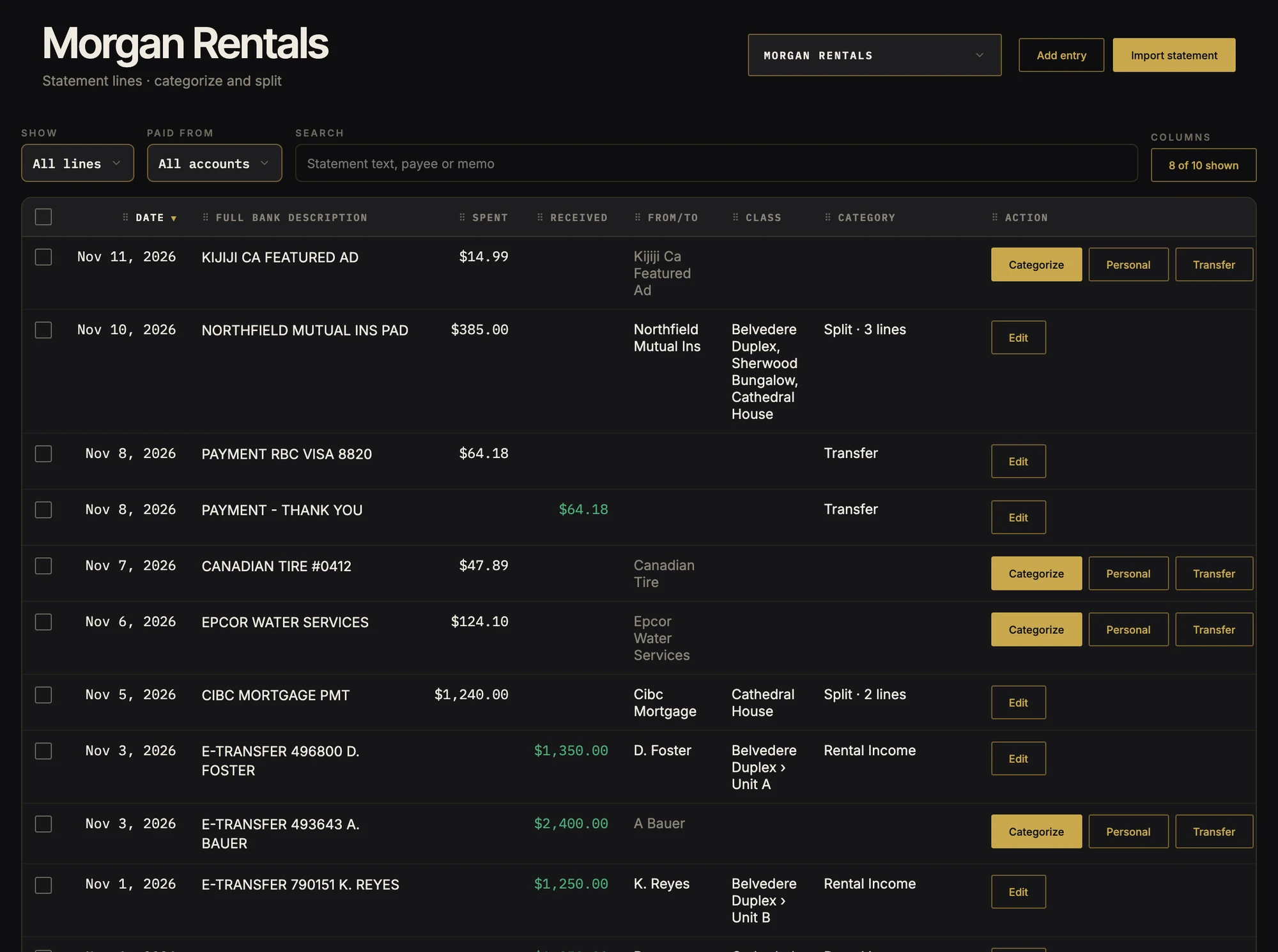
Books Imports for Morgan Rentals: rent e-transfers on their unit, a mortgage payment split into interest and principal, insurance split across three properties, and new lines to categorize
32Books

Every statement line, on its property

Rent lands on its unit, mortgages split into interest and principal, and the rent roll and paid repair invoices suggest the rest.

Sale projection for a duplex: low, base and high sale prices with selling costs, net proceeds and capital gains
33Sell

Sale projections

Net proceeds, capital gains and closing costs, before you list.

All 33 Real Estate featuresSee every one with real numbers.The demo opens on a sample investor. Nothing to set up, nothing saved.Try Real Estate in the demo →
→ Real Estate · cost per door

What it costs at your door count, with the books and e-signing

A rental app is rarely the whole bill. Without Canadian books (the T776, GST/HST) you add QuickBooks; without e-signing you add a signing subscription. FinCommand has both built in: Books replaces QuickBooks and gives every property its own class at no charge (QuickBooks only splits by property on Plus, at $110 a month), and leases are signed in FinCommand with no monthly cap. Billed yearly, in Canadian dollars.

Doors
The app+ QuickBooks · $360+ E-signing · $240
App and plan at 4 doorsCAD a year

Only FinCommand and EquityRise were built for Canadian rentals. Stessa and RentRedi don't take property in Canada, and Landlord Studio's rent collection and screening are US only. Habyn's rental plans are still in early access.

How we counted

Publicly listed prices, checked November 26, 2026, before sales tax. USD converted at 1.37. EquityRise has no tenant tools, so its tracker plan is shown. Habyn's yearly price is its monthly-billed-yearly rate; its extra units are counted at $8 a month, and above 25 units it quotes. DoorLoop doesn't publish its minimum spend; US$199 a month is the figure Capterra reports. Landlord Studio's free plan covers 3 units; beyond that, Pro plus US$1 a unit a month. FinCommand after beta is the core plan plus the door band; beta members who aren't founders get their first 10 doors free. With books and e-signing on, an app without the CRA T776 report gets QuickBooks Online EasyStart (CA$30 a month, before its first-months discount; splitting by property needs Plus at CA$110 a month, which FinCommand's Books does at no charge), and an app without unlimited landlord e-signing gets Dropbox Sign (about $240 a year). Subject to change.

→ Side by side

What you get, against the apps you're comparing

Comparing against

FinCommand next to the six money apps Canadians weigh it against most. Own rentals? Switch to rental apps. Where we don't have something yet, it says No.

Swipe the table to see all six →
Yes Partial No Not listed / couldn't confirm Only FinCommand
How we checked

FinCommand as of November 14, 2026. The other apps from their own websites, pricing pages, help centres and app-store listings, checked October 28, 2026 (Monarch's business tracking on November 14). Prices are each app's cheapest paid plan, in the currency it lists. Something here out of date? Tell us through Contact and we'll fix it.

→ The total bill

What these tools cost separately

One FinCommand login replaces all nine. Here's what the same tools cost on their own.

Buying them separatelyPer year
01 · Everyday money$770
Budgeting appcompared to Monarch$137
Credit card optimizercompared to CardPointers$99
Net worth trackingcompared to Kubera$343
Retirement planningcompared to ProjectionLab$177
Calculatorscompared to undebt.it$14
02 · Stock investors$489
Stock portfoliocompared to Sharesight$148
Stock researchcompared to Morningstar$341
03 · Real estate investors$430
Real estate managementcompared to Stessa$190
E-signaturescompared to Dropbox Sign$240
Separately, every year$1,689
FinCommand · all nine tools
$1,689 /yr
$14.99 /mo
Save 89%

You keep $1,509 a year. Stocks and your first 10 rental doors are free for beta members.

Get Full Access for 14 Days →
How we counted

Cheapest listed paid plan in each category, for one person. Monarch includes an AI assistant, so it's counted once. Stessa is its lowest listed tier. For e-signatures we use Dropbox Sign (formerly HelloSign, unlimited sending), because DocuSign's cheaper Personal plan is capped at 5 envelopes a month. Free options aren't counted: Empower is free but US-only, and free calculators are scattered and unsynced. Competitor pricing from publicly listed plans, June 2026; USD converted at ~1.37. Subject to change.

→ Plans — Beta pricing

One Command Centre. One Low Price.

Standard pricing once beta ends
The plan · Command Centre
$14.99 / mo
Billed monthly · cancel anytime
  • ✓ All seven modules included
  • ✓ Every AI feature · no API keys
  • ✓ Cloud sync across your devices · privacy-first
  • ✓ Cancel anytime
  • ✓ First 30 lock this rate for life
Get Started →
+ Stocks + Real Estate
Included · beta
Beta members: Stocks and your first 10 doors, for life
  • ✓ Stock Portfolio + Analyzer
  • ✓ Real Estate for up to 10 rental doors
  • ✓ Leases, e-sign, rent roll, tenant app
  • ✓ More doors from +$5/mo
Included in your plan ✓
+ Stocks Pro
$5 / mo
Portfolio + Performance are free for every member
  • ✓ Compare, dividends, Deep Dive research
  • ✓ Watchlist + earnings
  • ✓ Builder + rebalancing
  • ✓ Growth Projector
+ Real Estate · by doors
1 door · included
Your home + first rental door come with the plan. A duplex is 2.
  • 2–4 doors+$5/mo
  • 5–12 doors+$15/mo
  • 13–30 doors+$25/mo
  • 31–75 doors+$45/mo
  • 76–150 doors+$70/mo
Get Started →
Health, Wealth, and Real Estate by Ryan Lake, on Amazon.ca
→ Founder's brief

“Nothing on the market came close to fitting my needs, so I built it.”

Ryan Lake, founder. Real estate investor for nearly 20 years, stock investor, and author of Health, Wealth, and Real Estate.

Read the story →
→ Questions

Before you sign up.

01Is my financial data safe?

Yes. Your budget, net worth, investments, retirement plan and property portfolio are encrypted with AES-256-GCM before they're stored, using a key that's kept apart from the database. Anyone who broke into the database, or got hold of a backup, would see only scrambled text.

AES-256-GCMEncrypted before it's stored
  1. 01256-bit keysThe largest key size the AES standard allows. It's the U.S. government's approved standard, and the same key size the NSA requires for classified information. No one can guess a 256-bit key by trying combinations, not even with every computer on Earth.
  2. 02Your own keyEvery member has their own key, made from our master key plus their user ID, so even if one member's key leaked, no one else's data would be exposed.
  3. 03Scrambled fresh every saveEach save is sealed with new randomness, so two identical budgets never look the same when stored.
  4. 04Tamper-proofEach sealed value carries a check code. If anyone changes a single character, or moves one member's data onto another member, it refuses to open instead of showing wrong numbers.
02Do I have to connect my bank?

No. There are no bank logins: download a statement from your bank or card and drop it in. CSV files are read right in your browser, and PDFs are read by our AI service. That's by design: bank connections are unreliable and add unnecessary security risk across platforms. FinCommand is designed to work with any bank statement you upload, and it's built for customization, not automation. When everything happens on its own, it's easy to lose sight of your money. A little hands-on work up front gives you clarity and builds healthy habits, and building those habits is what FinCommand is for.

03Is there a free trial?

Yes: 14 days free, $0 today. A card is needed to start, but nothing is charged until day 14, and you can cancel before then. After that it's $14.99 a month during beta, and you can cancel anytime.

04What happens after beta?

The price goes to $19.99 a month, or $179.99 a year. The first 30 members keep $14.99 a month for life, and everyone who joins during beta keeps Stocks Pro and their first 10 rental doors. After beta, portfolio tracking stays free, Stocks Pro is $5 a month (or $42 a year), and Real Estate includes your home and one rental door, with more doors from $5 a month.

05Can I cancel anytime?

Yes. There's no contract: plans are month to month or yearly. If you also delete your account, everything we hold in the cloud is permanently deleted within 30 days.

06Do I need my own AI subscription or API keys?

No. Every AI feature is included in the plan. Requests go through our own secure server, so there's nothing to set up or pay for separately.

07Is it built for Canadians?

Yes. It's TFSA, RRSP and RRIF aware, puts CPP and OAS in your retirement plan, compares Canadian credit cards, and works in Canadian dollars throughout.

→ Request clearance

Ready to take command?

Get Full Access for 14 Days →
Limited billets · Cancel anytime · Stand by for access